A BAA Doesn't Make Texting PHI Safe

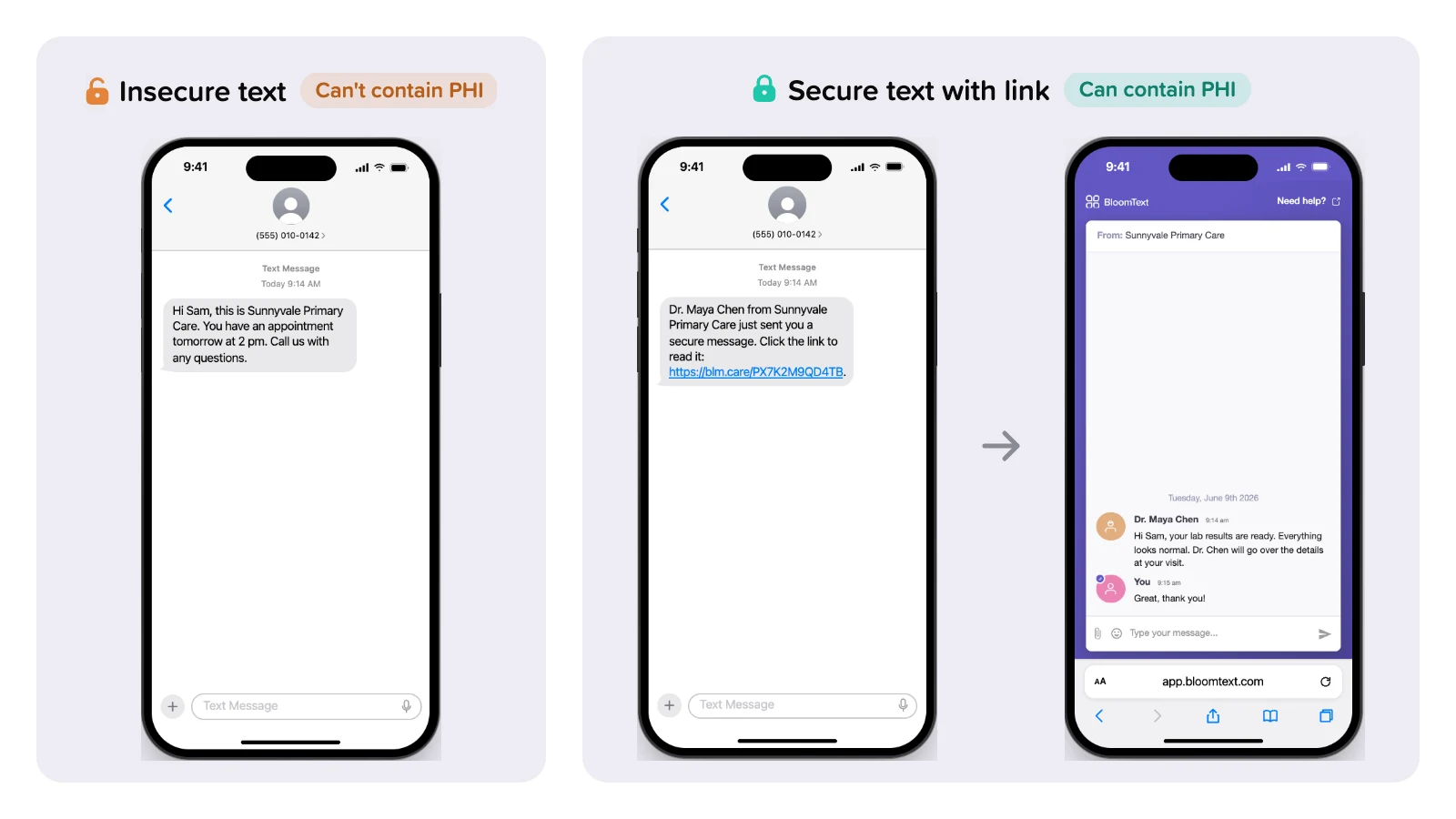
I talk with a lot of practices about texting patients, and one belief comes up more than any other: "Our texting vendor signed a BAA, so we can text PHI." It's an understandable assumption, and it's wrong. A BAA is a contract. It doesn't change what happens to a text message after you hit send.
Here's what a BAA covers, where plain texts still make sense, and how we built BloomText so your team can send PHI by text without putting it in the text.
What a BAA covers
A Business Associate Agreement (BAA) sets out the legal obligations of a vendor that handles PHI for you. HIPAA requires one, and BloomText includes a signed BAA for free.
What a BAA doesn't do is change how a plain text message travels. HHS makes a similar point in its guidance on cloud service providers: besides signing a BAA, you still have to understand the service and run your own risk analysis.
A plain text message (SMS) leaves your vendor and goes through the mobile carriers to the patient's phone. Along the way:
- carriers and the patient's phone store it unencrypted;
- it stays in the phone's messages, readable by anyone who picks up or unlocks the phone, for as long as it's kept;
- once it's sent, it can't be recalled.
Plain texts are still useful
Plenty of messages have no PHI in them, and for those a plain text is simpler for the patient: they read it right in their messages, with no link to tap. HHS defines PHI as health information that identifies the patient, including their health, the care they receive, and payment for that care. A text goes to the patient's own phone number, so it's already tied to them. The question to ask is whether the message reveals anything about their health, their treatment, the kind of care they get, or their bill.
These are fine as a plain text:
- "You have an appointment tomorrow at 2 pm. Call us with any questions."
- "Our office is closed Monday for the holiday."
- "Please call our office."
These are not:
- "Your appointment with Dr. Lee in oncology is tomorrow." It reveals the kind of care.
- "Your lab results are ready: your A1C is 7.2."
- "Your prescription for sertraline is ready for pickup."
- "Your balance for your MRI is $240."
- Any file, such as a referral, a record, an image or a form.
For reminders, HHS suggests including only the information needed to confirm the appointment, or asking the patient to call back. Keep plain texts that short. If your practice's name alone reveals the kind of care, as it can for a specialty clinic, follow your organization's policy on whether plain reminders are acceptable.
Send PHI by secure link
If a message has PHI, the PHI shouldn't be in the text. Send a text that holds only a link, and let the patient read your message somewhere secure.
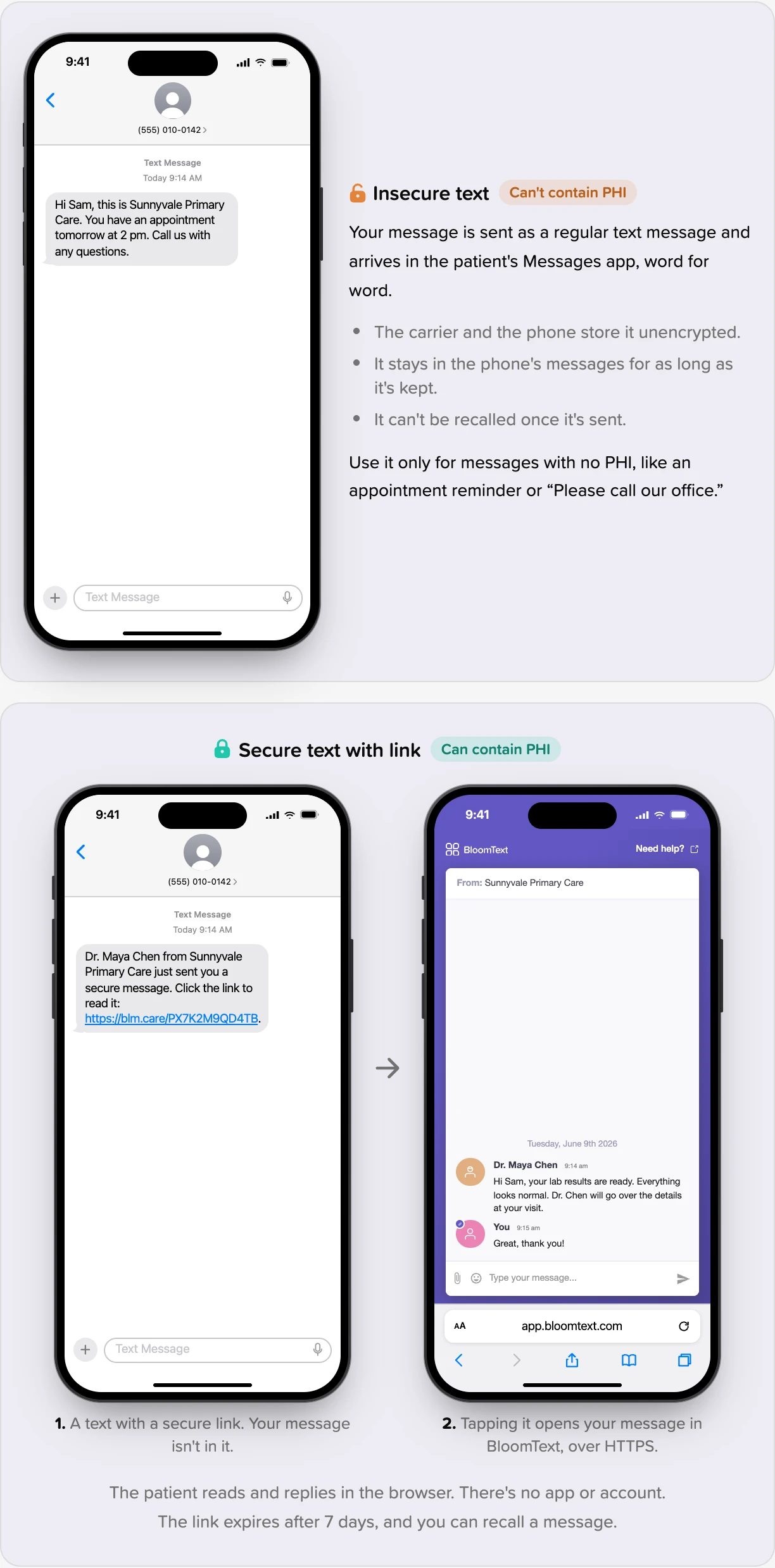
That's how a Secure text with link works in BloomText. The patient gets a text that says someone from your practice sent them a secure message, with a link. Tapping it opens the conversation in their browser over an encrypted (HTTPS) connection. Your message never goes through the carriers or sits in their message history.
Each link expires after 7 days, and the patient can get a new one with a tap, sent to the phone number on file. If someone on your team sends a message they shouldn't have, they can recall it.
Why BloomText is different
Most secure messaging asks the patient to do work first: download an app, create an account, remember a password. In my experience, a lot of patients never get that far, and staff drift back to plain texts and phone tag.
With BloomText, the patient taps the link and they're in the conversation. There's no app to download and no account or password to set up. They can read your message, reply, and attach files from their phone's browser.
It works for group conversations too. One secure chat can include several patients or family members along with your staff, and each patient gets their own link.
We also make the choice explicit. When your staff start a chat, they pick Secure text with link ("Can contain PHI") or Insecure text ("Can't contain PHI"). Insecure chats are labelled in the inbox and in the chat header, and the message box reminds staff not to include PHI. Nobody has to guess which kind of conversation they're in.
A quick checklist for your practice
- Set one rule: PHI goes by secure link, never in a plain text. If a patient asks to get PHI by plain text, follow your organization's policy or ask your privacy officer. HHS guidance on patients who ask for unsecure delivery doesn't address texting specifically.
- Share the examples above with your front desk.
- When in doubt, send a secure link. It works for every message.
- Send files, such as referrals, records, images and forms, by secure link.
- If a patient texts back with PHI, answer by secure link, not in the plain-text thread.
- Check the patient's phone number before you send a secure link. Anyone who has the link can open the conversation until it expires.
- If PHI goes out in a plain text by mistake, tell your privacy officer right away and follow your reporting process.
- Get a signed BAA from every vendor that handles your PHI, and run your own risk analysis.
For step-by-step instructions in BloomText, see our help article, Secure vs. insecure texting and HIPAA.
This post is general information, not legal advice.